Design your
Discord presence.
A desktop app for building custom Discord Rich Presence — design it, preview it live, and apply it in one click.
THE STUDIO
A studio, not a config file.
EDITOR
Design
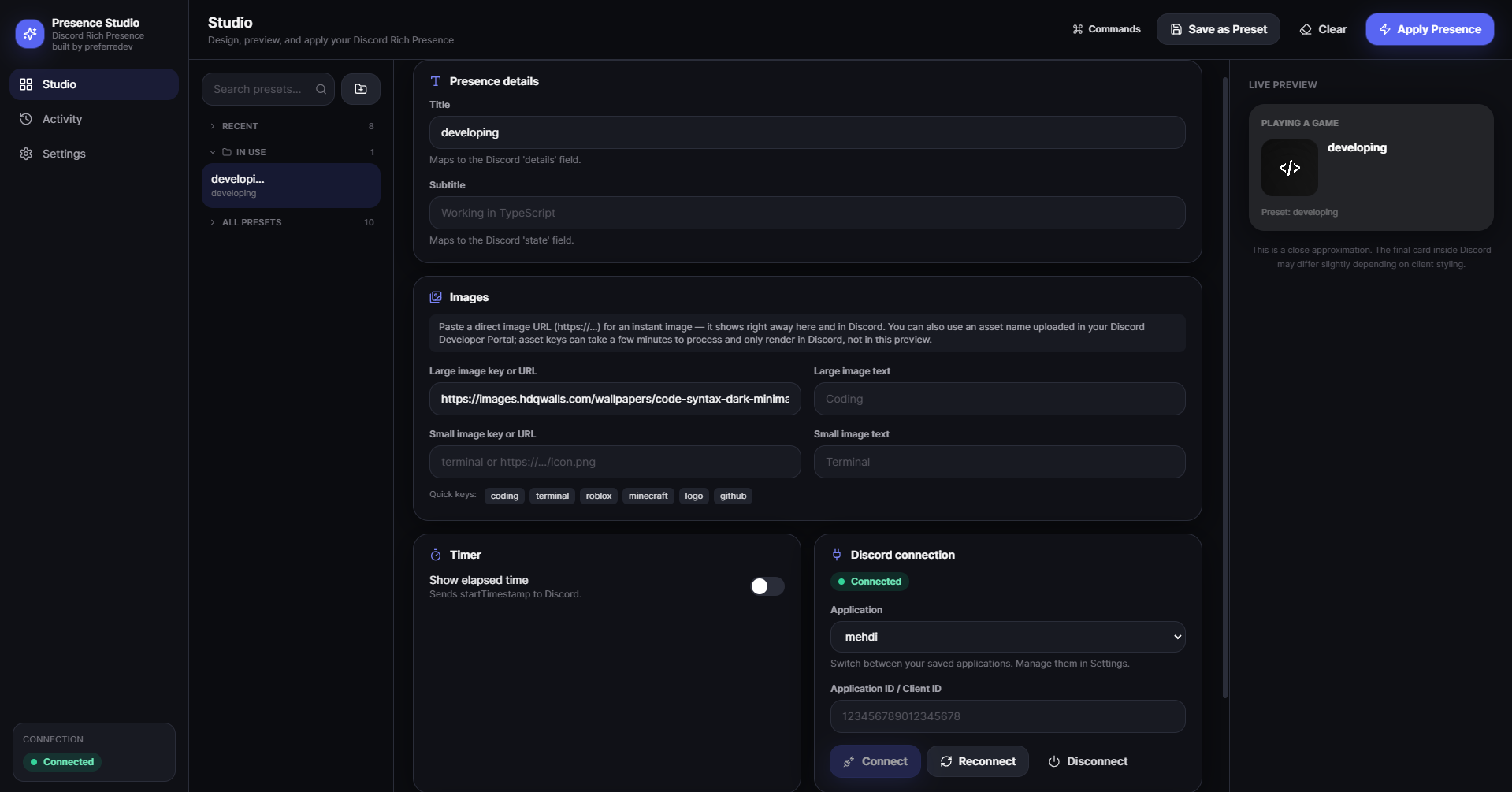
Set details, state, timestamps, and images in a clean editor — no JSON, no guesswork.
REAL-TIME
Live preview
See exactly how your presence card renders before it ever hits Discord.
INSTANT
One-click apply
Connect locally and push your presence instantly. Save presets and switch in a tap.
GETTING STARTED
From zero to presence in four steps.
Create a Discord application
Go to discord.com/developers/applications and create a new app — name it Status or Presence. Open portal
Copy your Application ID
From the app's General Information page, copy the Application ID.
Paste it into the Studio
Open Discord Presence Studio and paste the ID to link your app.
Build & apply your presence
Set your title, subtitle, images, and timestamps, preview it live, then hit Apply Presence. Discord must be running locally.
THE APP
Design on the left. See it on the right.
WORKS EVERYWHERE
Built on Electron.
Runs as a native desktop app on the platforms you already use.
CONTRIBUTORS
Built by the community.
The people shaping Discord Presence Studio.
